Thursday, May 2, 2013

Making of a USB fan

So,  I wanted a fan to cool my mk802+ , because it gets so hot after one hour of operation. Instead of buying a readymade fan, dad suggested that we make one ourselves. So,I went on YouTube and found that this was possible. So first step is to get:
  1. A cpu or a case fan
  2. An old USB cable
  3. A tool to cut and peel wires with
  4. Black insulating  tape for
First, cut the USB cable,  and peel it,  you should have 4 wires; 2 for power and 2 for data.

We'll be focusing on the power ones (usually the red and the black ones), same thing for the cpu fan.

We depend on the fact that both the USBs and the Fans run on 5.5 V
Same thing for the fan , we peel the wires and make them ready for welding with the USB ones.


Finally, after some trials and errors to which wires will work,  we weld everything together and here is a working USB fan.


This is another one i made at work 

Tuesday, April 9, 2013

All the files in a USB drive turned into EXE files

That's a panic , right ? . So , i got this flash drive with all the files inside of it shown as windows executables, when i showed all the system and the hidden files, I found that all the original files were hidden, and the shortcuts on the flash were only targeted to run the virus.

As I expected , the USB drive was virused . To cure it , i did the following :
1- Scanned it with AVG , to remove the virus.
2- Opened the CMD as an administrator.
3- Entered the following command :


attrib -S -H /S /D


-S : Removes the system attributes.
-H : Removes the Hidden attributes
/S : Works on sub-folders and files.
/D : Works on the directories' attributes as well.

That's it .. Good Luck

Sunday, March 31, 2013

MK802+ as a home server (Part 1)

So , I live in Egypt , no plans to upgrade my internet speed , and i have a huge list of downloads that i need done overnight. I don't want to leave my main desktop computer running all day with its loud fans and all. So ,the only solution I propose is having a home server. Ok , long story short, i bought an MK802+ (1GB model) MicroPC and i am planning to run it as a server for managing my downloads for now , and may be later help me with more techie issues like e.g. GIT server , DNS tunneling , etc.. I don't know how it will behave if it works 24/7 but i will try it anyway.

1st challenge : Get it to work with my old VGA monitor :
I knew that Mk802 has only an HDMI C (mini) output , so i bought this converter from amazon. At the time of writing, i didn't find any similar converters inEgypt, I asked most computer malls and most computer shops , including Radio Shack, they just don't have it. Anyway , you can always get stuff shipped to Egypt from amazon using edfa3ly , or may be by getting to know Americans :P .Anyway , it worked perfectly with my VGA monito. 

Ok , so by also buying an HDMI C to A converter from RadioShack , i had this setup here ---------------------------------------------------->>>>
1- The Micro PC
2- A USB mouse connected to the USB host port
3- To the top : an HDMI C to A , and then the HDMI to VGA adapter
4- A USB cable connecting it to a USB port of a computer just to get power to boot the device


Note : The MK802 comes with a power adapter , so you either power it using the USB 2.0 mini cable or the adapter to power the MicroPc.


2nd Challenge : Choose a suitable linux distro and install in on a new MicroSD
Since I am already waiting for my SD card to Ship (I could have bought it from any mall , but i am just too lazy) . I am now looking up different websites to get a linux distro that will fit my future needs without a lot of headache .. Once I get that i will flash it to the SD and boot from it, hopefully.

Good luck to me , i guess.

Monday, November 19, 2012

Where to download the full version of Skype

Hello hello .. So , I am always looking for full downloads , when i find them i share them here .. now It's Skype..

Link to the full download  .. http://www.skype.com/go/getskype-full

Sunday, October 21, 2012

Where to download AVG 2016 standalone offline installer

Hi again , don't spend time looking for the offline installer, The link to the AVG 2016 offline download files is here . The link is direct download for the windows 64-bit version of the AVG. Thanks to AVG company for providing one of the best virus protection around the globe for free....

Saturday, June 23, 2012

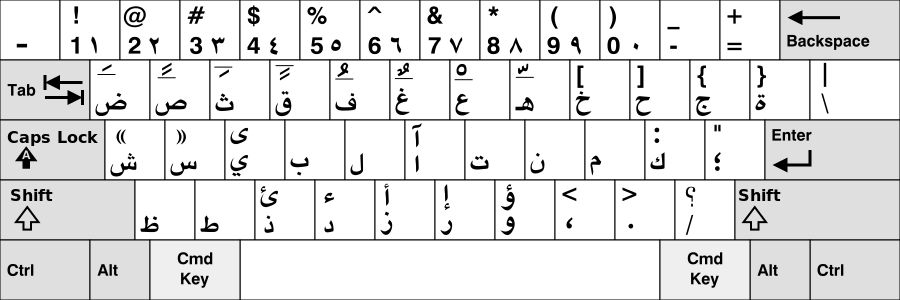
Windows Arabic Keyboard Layout for Mac Keyboards


I recently found that the Mac arabic keyboard layouts available online didn't work on my computer. I happen to work with a macbook pro with windows installed as a second OS option.. I wanted to use the Arabic language for writing my files , and then i discovered that the arabic mapping was different. I went online and i tried the popular Aktub and moeys arabic layouts , both didn't work for me  :(   .. I couldn't really identify the problem ,both will install just fine , but will not enable the layout on my 64 bit windows 7 machine.. Anyway , i searched online and i found this amazing tool from Microsoft , it's called The Microsoft Keyboard Layout Creator , and this is actually the tool that the mentioned website used to create their keyboard layouts. So , i created my own layout , and I also published it on GitHub , an open repository for code and downloads, so that people can re-create their own keyboards from the current layout if they want to...


Download Link @ github : here

Source Link @ github :  here


Additional instructions to use the download :
  1. Download the zip files from the link above
  2. extract to a location you'll remember
  3. Run the Setup ,then you'll have the language automatically added on 
  4. Use Alt+Shift to switch the language
It has been tested for compatibility with All windows versions : 7, 8, 9 and 10

Monday, April 30, 2012

Apply MSP patches to MSI (Slipstreaming)


So, I use an Active directory and group policies to assign software to the computer machines using the remote deploy function of the group policy, people now also use the SCUP ... I started sending the packages that I have to make sure that they should be updated , (for example : Adobe reader , Adobe flash player and plugins , office updates ,, etc)... I started to have MSP packages for all the software.. MSP are only patches , or can be considered as differences between msi(s) ..  Now we need to merge them into a new MSI so that this will be the package i send through group policy..

Steps :
1- Windows+R , and type cmd to open the command prompt
2- Copy the msi file and the msp files to any directory
3- Navigate using the command line to this directory
4- Go Ahead and write the command in the following format
 msiexec /a oldmsi.msi /p update1.msp               
5- A normal setup will open , this setup will actually update your existing MSI instead of installing the new patch on your computer ,, so that when you're done with the wizard , you can go back and re-run the MSI , and it will install the setup with the applied patches ....

NOTE: for Adobe reader ,, you'll have to:
1- Run msiexec /a C:\AIP\AdbeRdr1010_en_US.msi without any /p commands first , this will create an uncompressed image of the program . In this step , choose a folder for image creation , C:\AIP for example.. 
2- Run msiexec /a C:\AIP\AdbeRdr1010_en_US.msi /p AdbeRdrUpd1013.msp and you can choose the same directory , you will end up having the C:\AIP\adberdr1010_en_US.msi all patched to the latest 10.1.13 patch, and this will also resolve the "adobearmhelper.exe" error !!..


References :
  1. How to Apply Patches (.msp) to Group Policy Deployed Software (.msi) 
  2. Installation fails when slipstream update 10.1.2 into 10.1.0 MSI-Package
  3. http://helpx.adobe.com/content/dam/kb/en/837/cpsid_83709/attachments/Acrobat_Enterprise_Administration.pdf

Ϯⲥⲁϫⲓ : The Coptic Language Text-To-Speech Seed

Been a long while since I’ve written anything here. In my defense, I've been changing jobs, getting married and relocating. All of these...